Single Attribute: Add or remove one model from the scene
Article Brief
What this article covers:
- What the Single attribute does
- How you add or remove one model using a button
- How you configure Single attribute settings
Overview
Use the Single attribute to let you add or remove one specific model from the 3D scene.
This attribute works like an on/off switch and controls a single PCO.
You use the Single attribute when a model is optional, for example an extra component, accessory, or add-on.
What the Single attribute does
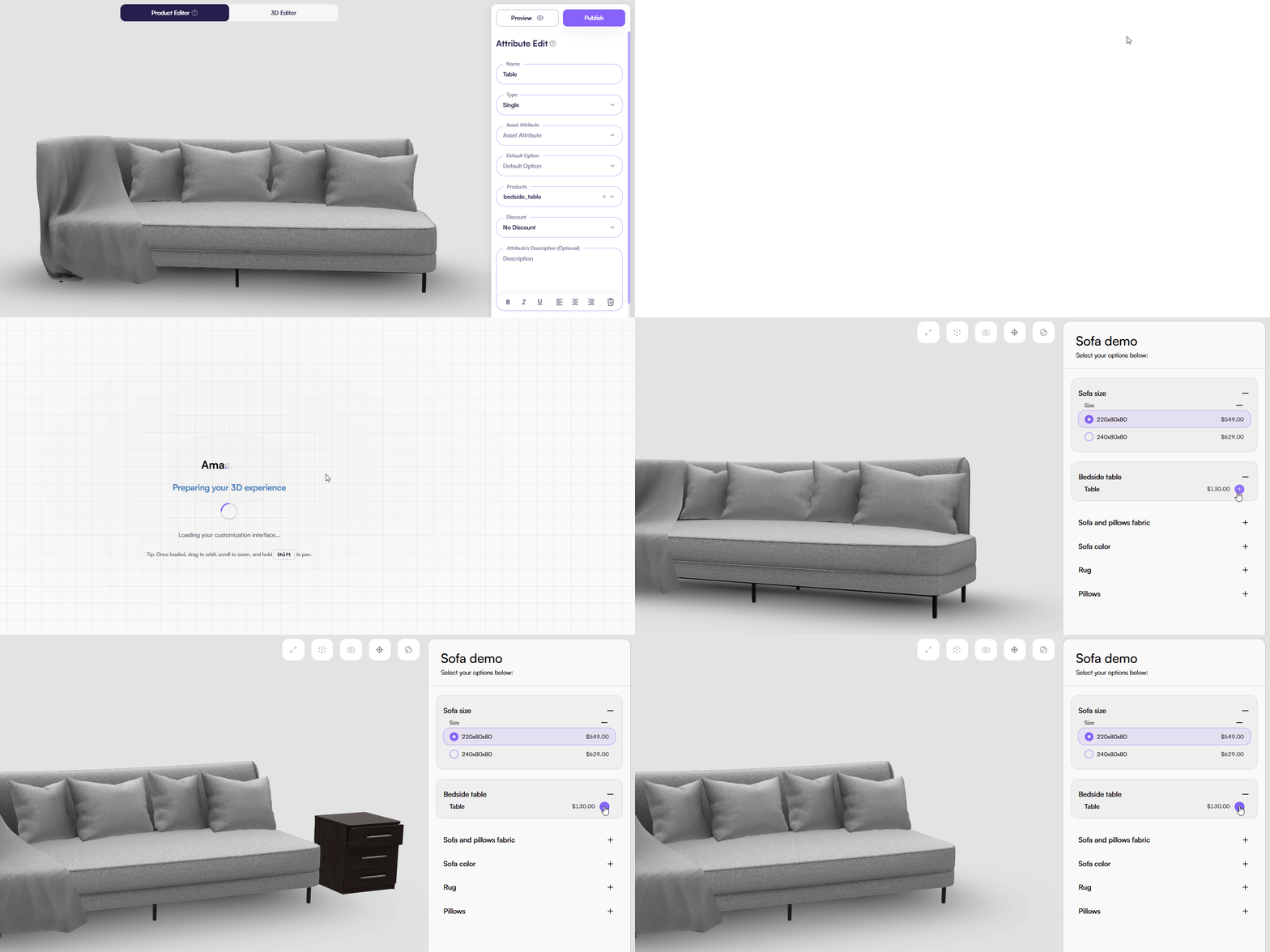
The Single attribute controls the presence of one PCO in the scene.
You either show the model or remove it completely.
When the attribute is active:
- The linked PCO appears in the scene
When the attribute is inactive:
- The PCO is removed from the scene
You always work with one PCO only.
UI behavior
Tips & Best Practices
- Use Single attributes for optional add-ons
- Write clear labels so you know what the button controls
- Avoid using Single when you need quantity control
Common Issues
-
The model does not appear
- Ensure that the tied PCO has the Model asset type.
-
The button did not appear in the UI.
- Ensure that you have linked the product to this attribute in the Products field.
Last updated on